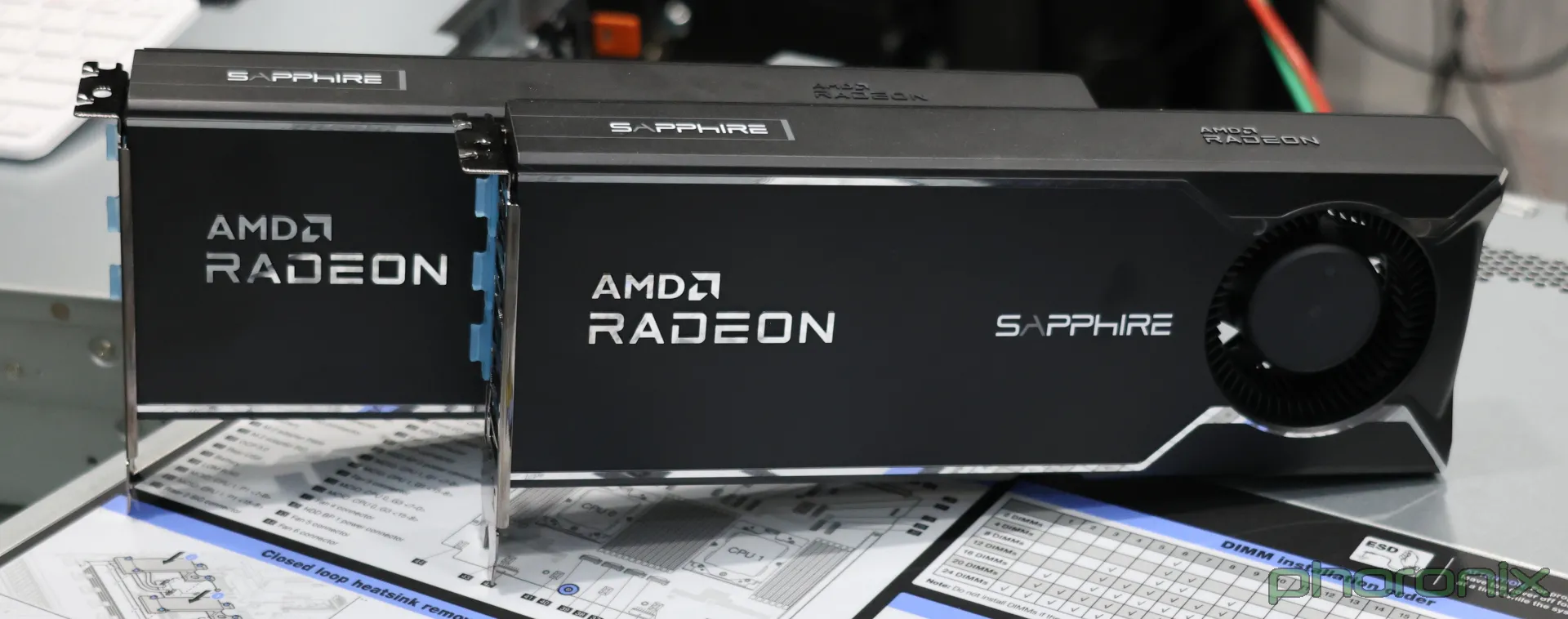
Adventures with AMD Radeon AI Pro R9700 (gxf1201)
Your Primer
Picking AMD and ROCm for AI is choosing hard mode. I guess you could pick a "harder" mode by using an Intel GPU or a less popular AI framework like Tiny Grad, but if you want the DIY experience of fussing with source builds and missing kernels, then AMD with ROCm will do just fine.
What is ROCm you say? Think of it as AMD's swing at competing with Nvidia CUDA, but with rougher edges. Like it's CUDA competitor, ROCm is the umbrella term for all of the libraries, tools, and abstractions used to program compute operations on these cards. Now, let's complicate things a little more and have two different micro architectures and instruction sets. In AMD land there is the CDNA family, which you will find in the datacenter accelerators like the MI300, and then there is the RDNA family, which you will find in your edgy PC gamer desktop builds. Since the AI boom is primarily happening in datacenters, CDNA cards will have better support for pretty much everything in the ROCm stack.
A Tale of Two Cards
With that out of the way let's talk about my experience. On 10/25/2025 AMD launched the Radeon AI Pro R9700, a new AI workstation card marketed as "AI ready!". Let's see some specs!
Radeon AI Pro R9700:
| Specification | Value |
|---|---|
| GPU Architecture | AMD RDNA™ 4 |
| Ray Accelerators | 64 |
| AI Accelerators | 128 |
| Stream Processors | 4096 |
| Compute Units | 64 |
| Boost Frequency | Up to 2920 MHz |
| Game Frequency | 2350 MHz |
| Peak Pixel Fill-Rate | Up to 373.76 GP/s |
| Peak Single Precision (FP32 Vector) Performance | 47.8 TFLOPs |
| Peak Half Precision (FP16 Vector) Performance | 47.8 TFLOPs |
| Peak Half Precision (FP16 Matrix) Performance | 191 TFLOPs |
| Peak Half Precision (FP16 Matrix) Performance with Structured Sparsity | 383 TFLOPs |
| Peak 8-bit Precision (FP8 Matrix) Performance (E5M2, E4M3) | 383 TFLOPs |
| Peak 8-bit Precision (FP8 Matrix) Performance with Structured Sparsity | 766 TFLOPs |
| Peak 8-bit Precision (INT8 Matrix) Performance | 383 TOPs |
| Peak 8-bit Precision (INT8 Matrix) Performance with Structured Sparsity | 766 TOPs |
| Peak 4-bit Precision (INT4 Matrix) Performance | 766 TOPs |
| Peak 4-bit Precision (INT4 Matrix) Performance with Structured Sparsity | 1531 TOPs |
| ROPs | 128 |
| Transistor Count | 53.9 Billion |
| OS Support | Windows 10 (64-Bit), Windows 11 (64-Bit), Linux x86 64-Bit |
| Wattage | 300W |
As for memory it has:
| Specification | Value |
|---|---|
| Dedicated Memory Size | 32 GB |
| Dedicated Memory Type | GDDR6 |
| AMD Infinity Cache Technology | 64 MB |
| Memory Interface | 256-bit |
| Peak Memory Bandwidth | 640 GB/s |
| Memory ECC Support | Yes (Linux Only) |
The price tag starts at $1300 and unlike the a 5090 these aren't made of Unobtanium. Did you notice it's an RDNA4 card? That's right, this is basically a Radeon RX 9070 XT with 32GB of ram and a blower fan. Roughly, I like to describe this as 60% of a 5090 at 40% the cost. Arguably though, we should be comparing this to the NVIDIA RTX PRO 4500 Blackwell workstation card.
NVIDIA RTX PRO 4500 Blackwell:
| Specification | Value |
|---|---|
| GPU Name | GB203 |
| Architecture | Blackwell 2.0 |
| Process Size | 5 nm |
| Transistors | 45,600 million |
| Release Date | Mar 18th, 2025 |
| Base Clock | 1635 MHz |
| Boost Clock | 2407 MHz |
| Memory Size | 32 GB |
| Memory Type | GDDR7 |
| Bandwidth | 896.0 GB/s |
| Tensor Cores | 328 |
| FP16 (half) | 50.53 TFLOPS (1:1) |
| FP32 (float) | 50.53 TFLOPS |
| Wattage | 200W |
This card comes in at $2,759.99 on Newegg as of 02/27/2026. Unfortunately, I could not find INT4, INT8, and FP8 metrics anywhere. At FP32/FP16 though the AMD Radeon Pro R9700 and Nvidia RTX Pro 4500 are in the same ball park. The memory bandwidth of the NVIDIA RTX PRO 4500 is 40% faster (GDDR7 vs GDDR6) and on a per watt basis it is also 50% more efficient at compute. That price though. You can get two AMD Radeon Pro R9700 cards for the price of one NVIDIA RTX PRO 4500, and that's just what I did.
The Build
I was fortunate enough to start buying my PC parts at the start of the transistor apocalypse. I did pay a bit of a premium for my ram but not nearly what ya'll are getting charged today.
| Part | Value |
|---|---|
| CPU | AMD Ryzen 9 9900X3D |
| RAM | 128 GB 5600 Mhz |
| Motherboard | ASUS ProArt X870E-CREATOR |
| Hard drive | Samsung SSD 9100 PRO 2TB |
| GPU | AMD Radeon AI Pro R9700 (2x) |
| Power Supply | Thermaltake 1650W |
| Case | Fractal Design North XL |
| Cooler | ASUS ProArt LC 360 AIO |
Gimme Those Tokens!
Ok, initially I only had one GPU so we have to walk down this road a little before we get to the dual wielding beast this machine became. I have the unfounded belief that Mistralai Devstral Small 2 24B is going to be the model for local coding agents. Let's get into some of the details of this one before we come back to talking inference hosting.
The Devstral Small 2 is a 24 billion parameter dense model in FP8. At inference time, all 24B parameters are activated for each input. This is in contrast to a mixture of experts(MOE) like the Qwen3 line of agentic coding models. In an MOE only a small subset of the parameters is active, and a router identifies which expert to activate. There is more nuance than just raw active parameter count though, so let's talk about hidden dimensions.
In an LLM the hidden dimension size defines the size of the vectors the model uses. We can think of this as the "resolution" of tokens. A higher hidden dimensionality, means it can potentially capture more nuance in the relationships between tokens. I say potentially, because it still comes down to training. There is a tax to high dimensionality though, and you pay for it in VRAM. You can roughly guesstimate the KV cache with the following equation: 2×Layers×Hidden Dimension=size. So double the hidden dimensions and we double the cost per token in the KV cache, which in turn determines how large of a context window we can operate with, given the finite resources of our machine.
The Radeon Pro R9700 has 30 GiB of VRAM, if you have ECC enabled, which I do because I'm not a savage. At FP8 for most of the layers it takes roughly 28.8 GiB of VRAM on vLLM. Effectively this leaves me with no usable context window.
The Side Questing Begins
Side Quest 1: Quantization
I prefer vLLM, but that's just because I have used it frequently for work. Looking on Huggingface I found a 4-bit weight https://huggingface.co/cyankiwi/Devstral-Small-2-24B-Instruct-2512-AWQ-4bit version which could halve the memory requirements. Firing it up in vLLM using the ROCm Nightly build, I found the CounchLinear kernel is the only one that would work, but not with a group size of 32 this quant uses. Of course I'd do what any reasonable person would do at that point. I stalked the developer of this quantized version across multiple social networks and eventually convinced him to share his LLM Compressor scripts and methodology. A couple hours on a rented H100, and I had my own shiny new quantized version with a 128 group size. Round two and I get a 10 tps single user experience. Not usable. Really, this is a problem with ROCm and AITER. AMD just doesn't appear to have kernels there for W4A16 models.
Side Quest 2: Pivot to Llama.cpp
It's at this point you may be picking up on a particular character flaw. I love me a good underdog. You tell me turn right, I go left. Nvidia cards are the best, I buy AMD. I probably should have just used llama.cpp directly or LM Studio, but for this side quest I chose Ollama instead.
Interesting thing about Ollama, they use ROCm 6.x and the gfx1201 (my card) isn't really supported until ROCm 7.2. Don't get me wrong, you can lie and say its an older RDNA3 card and it may work, but that's not for me. It was at this time I signed up for the AMD AI Developer Program and got access to the Discord. With the help of #resolver0 and AMD_LOG_LEVEL=3 OLLAMA_DEBUG=2, I was able to build an Ollama 0.15.4 fork with ROCm 7.2. I also have a docker image if you'd like to try it out for yourself.
docker run -d --name ollama-rocm7p2 \
    --device /dev/kfd \
    --device /dev/dri \
    --group-add video \
    -e HSA_OVERRIDE_GFX_VERSION=12.0.1 \
    -p 11434:11434 \
    --security-opt seccomp=unconfined \
    -v ~/.cache/huggingface:/root/.cache/huggingface \
    -v ./:/model \
    --env "HF_TOKEN=$HF_TOKEN" \
    --ipc=host \
    androiddrew/ollama:0.15.4-rocm-7.2
I don't really have any complaints about Ollama. It works. Using the unsloth Devstral-Small-2-24B-Instruct-2512-UD-Q4_K_XL.gguf took 14.4 GiB of VRAM, leaving me with 15.6 GiB for context. I was getting roughly 33 TPS at decode for a single user experience, but that context window is less than 40K. Since I want to use Opencode and crank it up to 120K context window I really am only left with two options. Use this new Ollama build to offload layers on to the CPU so I can get more context, or acquire more VRAM.
Side Quest 3: Money Solves Problems
Well, I was fortunate enough that by this time it was my birthday and the wife did not begrudge me spending an additional $1300. Turns out though I needed a larger power supply too, but I didn't share that. Now that I am equipped with a dual-wielding beast with 62 GiB of usable VRAM, it was time to re-evaluate my inference choices. Llama.cpp is pretty damn decent, but it lacks true tensor parallelism. With vLLM I can split the model weights across both GPUs, allowing me to load models I couldn't on a single GPU and leverage the full available VRAM for my purposes.
Remember that 10 TPS I saw with my 4-bit quantized version? Well at the standard FP8 I actually get a useable kernel from the ROCm stack. With 28.8 GiB of model weights, that leaves me with 33.2 GiB for context window. At standard FP16 that's 217,000 tokens. There is enough VRAM there now for two concurrent sessions with max-context-len 100,000+. Unfortunately, I couldn't get KV cache at FP8 to work, but no need to be greedy. I have enough compute for me and a friend.
So what am I seeing for performance? Well a quick benchmark showed:
Throughput: 3.03 requests/s, 1369.18 total tokens/s, 659.90 output tokens/s
Total num prompt tokens:  23401
Total num output tokens:  21772
Single user sees about low 30's for TPS during decode phase.
(APIServer pid=2725) INFO 02-24 20:57:23 [loggers.py:257] Engine 000: Avg prompt throughput: 6.3 tokens/s, Avg generation throughput: 29.5 tokens/s, Running: 1 reqs, Waiting: 0 reqs, GPU KV cache usage: 0.3%, Prefix cache hit rate: 0.0%, MM cache hit rate: 0.0%
(APIServer pid=2725) INFO 02-24 20:57:33 [loggers.py:257] Engine 000: Avg prompt throughput: 0.0 tokens/s, Avg generation throughput: 33.8 tokens/s, Running: 1 reqs, Waiting: 0 reqs, GPU KV cache usage: 0.5%, Prefix cache hit rate: 0.0%, MM cache hit rate: 0.0%
Not, bad. Certainly usable, and definitely can have multiple agents running at the same time. The thing to remember is performance is just going to keep getting better. Both Ollama and vLLM right now lack the CK Attention that AMD recommends for these cards, and none of the kernels that ship in rocm-libs are tuned yet for the gxf1201. This performance is purely using the fallback kernels. If you believe their stats, we could see a 15%-25% bump in performance for certain model shapes.
Side Quest 4: Opencode and vLLM
I did not know what it would take to get Opencode and vLLM to play nice with each other. I will keep this brief for you, but this did take a couple of hours trying to figure out what the hell I was doing. The key things needed were the following settings in vllm and the opencode config.
--tool-call-parser mistral--tokenizer_mode mistral--enable-auto-tool-choice--chat-template-content-format string
Full command used:
export MODEL_PATH='mistralai/Devstral-Small-2-24B-Instruct-2512'
vllm serve $MODEL_PATH \
    --host 0.0.0.0 \
    --port 8000 \
    --max-model-len 150000 \
    --tensor-parallel-size 2 \
    --gpu-memory-utilization 0.90 \
    --max-num-seqs 1 \
    --dtype auto \
    --tool-call-parser mistral \
    --enable-auto-tool-choice \
    --chat-template-content-format string \
    --tokenizer_mode mistral \
    --trust-remote-code \
    --skip-mm-profiling \
    --limit-mm-per-prompt '{"image": 2}'
      rocm/vllm-dev:rocm7.2_navi_ubuntu24.04_py3.12_pytorch_2.9_vllm_0.14.0rc0
Full Opencode json config:
  "$schema": "https://opencode.ai/config.json",

  "tools": {
    "bash": true,
    "edit": true,
    "write": true,
    "read": true,
    "grep": true,
    "glob": true,
    "list": true,
    "lsp": true,
    "patch": true,
    "skill": true,
    "todowrite": true,
    "todoread": true,
    "webfetch": true
   },

  "provider": {
    "warpspace-vllm": {
      "npm": "@ai-sdk/openai-compatible",
      "name": "vLLM (Warpspace)",
      "options": {
        "baseURL": "http://10.0.1.141:8000/v1",
          "apiKey": "shouldnotmatteri",
          "supportsStreaming": false,
      },
      "models": {
        "mistralai/Devstral-Small-2-24B-Instruct-2512": {
          "name": "mistralai/Devstral-Small-2-24B-Instruct-2512",
            "capabilities": {
            "tools": true
          }
        }
      }
    }
  }
}
Let’s Put a Bow on This Llama
Thank you for sticking it out until the end. I stand by my statement that choosing AMD is choosing hard mode for AI. If you want something that "just works" and you have the money, just buy Nvidia or a Mac M4 Studio. For me though, this friction is what's necessary for me to learn. I'm not an expert when it comes to AI, even though I pretend to be when at work most days, but these past few weeks have demystified gen-ai for me. If you have any questions you either already know me, or you can @androiddrew on the AMD Developer Community Discord.